


Type Safety
Void infers types from your database schema, route handlers, and page loaders. When you change a field, TypeScript shows which queries, requests, and components need to change.
The Type Pipeline
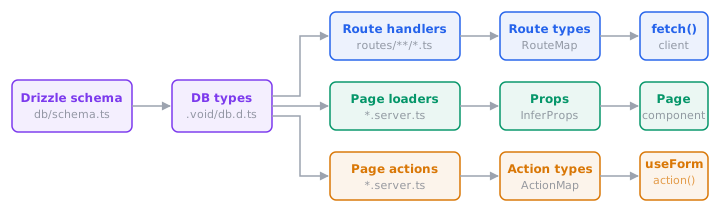
- Database types come from your Drizzle schema. Column types are known at compile time.
- Route handlers: return types and validator schemas become the generated
RouteMap, which the typed fetch client consumes. - Page loaders: return types flow into page components as props via
InferProps. - Page actions: validator schemas flow into
useFormandaction()for typed data, errors, and URL autocomplete.
All generated types live in .void/ and update automatically when source files or schema change.
Database → Handler → Client
Types flow from your Drizzle schema through handlers to the client without any manual annotations:
// routes/api/users.ts
export const GET = defineHandler(async (c) => {
  return db.select({ name: users.name, email: users.email }).from(users);
  //     ↑ return type inferred from schema columns
});

export const POST = defineHandler.withValidator({
  body: insertUserSchema, // ← derived from Drizzle schema
})(async (c, { body }) => {
  return db.insert(users).values(body).returning();
});// Client: types inferred from handlers above
const users = await fetch('/api/users');
// ↑ { name: string; email: string }[]
await fetch('/api/users', {
method: 'POST',
body: { name: 'Alice', email: 'alice@example.com' }, // ← typed from validator
});The Drizzle schema defines database columns, runtime validation, handler input types, and client-side type checking all at once. For endpoints that don't map to a table, use any Standard Schema library.
Loader → Page Props
In pages mode, a loader's return type flows into the page component via InferProps:
// pages/users/index.server.ts
export type Props = InferProps<typeof loader>;

export const loader = defineHandler(async (c) => {
  return { users: await db.select().from(users) };
});<!-- pages/users/index.vue -->
<script setup lang="ts">
import type { Props } from './index.server';
defineProps<Props>(); // ← { users: { id: number; name: string; ... }[] }
</script>No manual interface is needed. Props stay in sync with whatever the loader returns.
Action → useForm
When a page action uses withValidator(), the body schema flows through to useForm. That gives you typed data, typed errors keys, and URL autocomplete:
// pages/users/create.server.ts
export const action = defineHandler.withValidator({
  body: insertUserSchema,
})(async (c, { body }) => {
  await db.insert(users).values(body);
});const form = useForm('/users/create', { name: '', email: '' });
// ^ autocompletes ^ must match body schema
form.errors.email; // ✓ string | undefined
form.errors.foo; // ✗ TypeScript errorNamed actions work the same way. The ?actionName suffix selects the right types for that action:
const updateForm = useForm('/users/:id?update', { name: '' }, { params: { id } });
const deleteForm = useForm('/users/:id?delete', { id: '' }, { params: { id } });
// Each form's data and errors are typed from their respective validators
The action() helper gets the same type checking. See Actions & Forms for the full API.
What Gets Checked
| Layer | What's type-checked |
|---|---|
| Database | Table columns, value types, insert/update shapes from Drizzle schema |
| Handlers | c.env bindings, validator input, return type |
| Fetch client | Route paths, HTTP methods, body/query/params, response type |
useForm | Action URLs, data fields, errors keys, reset() args, params |
action() | Action URLs, data payload, params |
Serialization
The client types reflect JSON serialization through Serialize<T>:
| Source type | Serialized type |
|---|---|
string, number, boolean | unchanged |
Date | string |
Response | excluded (passed through at runtime) |
bigint, Function, undefined | excluded |
Array<T> / { key: T } | recursively serialized (function-valued keys stripped) |
Context Variables
Middleware and handlers share typed data through Hono's context variables. Augment CloudContextVariables to define your own:
// middleware/01.auth.ts
declare module 'void' {
  interface CloudContextVariables {
    requestId: string;
  }
}

export default defineMiddleware(async (c, next) => {
  c.set('requestId', crypto.randomUUID());
  await next();
});
Now c.get("requestId") returns string everywhere, with no assertion needed. Multiple augmentations across files are merged together.
Setup
Extend the generated tsconfig in your project:
{
  "extends": "./.void/tsconfig.json",
  "compilerOptions": {
    "target": "ES2022",
    "module": "ES2022",
    "moduleResolution": "bundler",
    "strict": true,
    "jsx": "react-jsx",
    "types": ["void/env"]
  },
  "include": ["src", "routes", "middleware", "crons", "queues"]
}
If you already have a TypeScript config, run void init --tsconfig to add Void types while preserving your settings.
Run void prepare in CI or after a fresh clone, or let vite dev / vite build generate the .void/ files during normal app workflows.